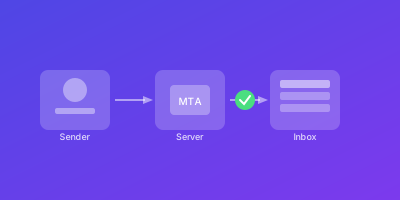
Sender Policy Framework (SPF) is your first line of defense against email spoofing. It specifies which mail servers are authorized to send email on behalf of your domain.
When a receiving mail server gets an email from your domain, it checks your SPF record to verify authorization. Proper SPF configuration is essential for email deliverability.
What is SPF (Sender Policy Framework)?
SPF is an email authentication standard defined in RFC 7208. It allows domain owners to specify which IP addresses and servers can send email using their domain name.
How SPF Works
- You publish an SPF record as a DNS TXT record at your domain root
- When an email is received, the server extracts the envelope sender domain
- The receiving server looks up your SPF record
- It checks if the connecting IP matches any authorized sources
- The result determines how the email is handled
SPF Result Types
| Result | Meaning |
|---|---|
pass | IP is authorized |
fail | IP is explicitly not authorized |
softfail | IP is probably not authorized |
neutral | Domain makes no assertion |
temperror | DNS lookup issue |
permerror | Syntax error in record |
Why Proper SPF Configuration Matters
SPF is a mandatory component of email authentication. Its importance increased significantly with the 2024 Gmail and Yahoo requirements.
Deliverability Impact
- Emails failing SPF are more likely to be marked as spam
- Proper SPF demonstrates you take email security seriously
- Major providers require SPF for bulk senders
Security Benefits
SPF provides protection against basic email spoofing attacks. While not foolproof alone, it makes it harder for attackers to impersonate your mail servers.
Common SPF Problems
- Exceeding the 10 DNS lookup limit
- Forgetting to include third-party senders
- Using deprecated mechanisms
- Syntax errors in the record
How to Configure SPF Records
SPF configuration starts with identifying all legitimate sources that send email using your domain.
Step 1: Inventory Your Email Sources
List all systems that send email as your domain:
- Primary mail server
- Marketing platforms (Mailchimp, HubSpot, etc.)
- CRM systems (Salesforce, etc.)
- Transactional email services (SendGrid, Postmark)
- Support ticketing systems
- Any other third-party tools
Step 2: Understand SPF Syntax
A basic SPF record follows this structure:
v=spf1 [mechanisms] [qualifier]all
Required elements:
v=spf1- Version prefix (required)- Mechanisms - Define authorized senders
all- Specifies how to handle non-matching senders
Step 3: Learn Common Mechanisms
| Mechanism | Purpose | Example |
|---|---|---|
ip4: | Authorize IPv4 address/range | ip4:192.0.2.0/24 |
ip6: | Authorize IPv6 address/range | ip6:2001:db8::/32 |
include: | Reference another domain's SPF | include:_spf.google.com |
a | Authorize domain's A record IPs | a |
mx | Authorize domain's MX servers | mx |
Step 4: Understand Qualifiers
Qualifiers are placed before mechanisms:
+(pass) - Default, authorize the source-(fail) - Reject if matched~(softfail) - Accept but mark suspicious?(neutral) - No assertion
Step 5: Build Your SPF Record
Example for Google Workspace only:
v=spf1 include:_spf.google.com -all
Example for Google Workspace + SendGrid:
v=spf1 include:_spf.google.com include:sendgrid.net -all
Example with custom mail server:
v=spf1 ip4:192.0.2.0/24 include:_spf.google.com include:sendgrid.net -all
Common Provider Include Statements
# Google Workspace
include:_spf.google.com

# Microsoft 365
include:spf.protection.outlook.com

# SendGrid
include:sendgrid.net

# Mailchimp
include:servers.mcsv.net

# Amazon SES
include:amazonses.com

# Postmark
include:spf.mtasv.net
Copy-Paste SPF Records by Provider
Here are ready-to-use SPF records for common provider combinations. Replace example.com with your domain and add as a DNS TXT record at the domain root.
Gmail / Google Workspace Only
example.com. IN TXT "v=spf1 include:_spf.google.com -all"
Microsoft 365 / Office 365 Only
example.com. IN TXT "v=spf1 include:spf.protection.outlook.com -all"
Google Workspace + Mailchimp
example.com. IN TXT "v=spf1 include:_spf.google.com include:servers.mcsv.net -all"
Google Workspace + SendGrid
example.com. IN TXT "v=spf1 include:_spf.google.com include:sendgrid.net -all"
Microsoft 365 + Mailchimp
example.com. IN TXT "v=spf1 include:spf.protection.outlook.com include:servers.mcsv.net -all"
Microsoft 365 + SendGrid
example.com. IN TXT "v=spf1 include:spf.protection.outlook.com include:sendgrid.net -all"
Google Workspace + SendGrid + Mailchimp
example.com. IN TXT "v=spf1 include:_spf.google.com include:sendgrid.net include:servers.mcsv.net -all"
Custom Mail Server + Google Workspace + SendGrid
example.com. IN TXT "v=spf1 ip4:203.0.113.10 include:_spf.google.com include:sendgrid.net -all"
include: and its nested includes count toward the 10-lookup limit.Common SPF Mistakes
These are the most frequent SPF configuration errors and how to fix them:
| # | Mistake | Consequence | Fix |
|---|---|---|---|
| 1 | Multiple SPF records on same domain | PermError — all SPF checks fail | Merge into a single v=spf1 ... -all record |
| 2 | Exceeding 10 DNS lookups | PermError — emails rejected or marked spam | Use IP flattening, move senders to subdomains, remove unused includes |
| 3 | Using +all | Anyone can spoof your domain | Change to -all (or ~all during testing) |
| 4 | Forgetting a sending source | Legitimate emails fail SPF | Audit all systems sending as your domain before publishing |
| 5 | Using ~all permanently | Weaker spoofing protection, some providers ignore softfail | Switch to -all once all senders are confirmed |
| 6 | Stale includes for decommissioned services | Wasted lookups, potential security risk if domain is reused | Review and remove unused includes quarterly |
| 7 | Using ptr mechanism | Slow, unreliable, and deprecated by RFC 7208 | Replace with ip4: or include: mechanisms |
| 8 | Missing v=spf1 prefix | Record is not recognized as SPF | Always start the record with v=spf1 |
| 9 | Syntax errors (extra spaces, missing colons) | PermError — entire record invalid | Validate with an SPF checker before publishing |
| 10 | Not setting SPF on subdomains | Subdomains without SPF inherit nothing, can be spoofed | Add v=spf1 -all to subdomains that do not send email |
SPF Validation Checklist
Follow these 10 steps every time you create or modify an SPF record:
- Inventory all senders — List every system, service, and third-party tool that sends email as your domain (marketing, transactional, support, CRM, internal apps)
- Verify you have exactly one SPF record — Run
dig +short TXT example.com | grep spfand confirm only one result starting withv=spf1 - Check syntax — Validate the record with an online SPF checker (MXToolbox, dmarcian, or EasyDMARC)
- Count DNS lookups — Verify the total is 10 or fewer (include nested lookups from each
include:mechanism) - Confirm all IPs are covered — Send a test email from each sending source and check the
Received-SPFheader showspass - Verify the qualifier — Use
~allonly during initial testing; switch to-allfor production - Test with major providers — Send test emails to Gmail, Outlook, and Yahoo; check SPF pass in email headers
- Set SPF on non-sending subdomains — Add
v=spf1 -allto any subdomain that should never send email - Document the record — Record which service corresponds to each mechanism, when it was added, and who owns it
- Schedule quarterly reviews — Set a calendar reminder to audit your SPF record for stale includes, lookup count, and new sending sources
SPF Configuration Best Practices
Follow these practices to maintain a healthy SPF record.
Use Hard Fail (-all)
Always use -all (hard fail) once you've confirmed all legitimate senders are included:
# Recommended for production
v=spf1 include:_spf.google.com -all

# Only during initial testing
v=spf1 include:_spf.google.com ~all
~all (softfail) only during initial testing. Switch to -all once verified.Monitor DNS Lookup Count
SPF is limited to 10 DNS lookups. Each of these counts:
include:mechanismsamechanismsmxmechanismsredirectmodifiers- Nested includes within referenced records
Check your total with online SPF validators:
# Example command to check SPF record
dig +short TXT example.com | grep spf
permerror, failing all SPF checks for your domain.Keep Records Simple
- Consolidate IP ranges using CIDR notation
- Remove services you no longer use
- Avoid redundant mechanisms
- Document every entry
Use Subdomain Strategies
Consider using subdomains for different email types:
# Root domain - minimal
example.com: v=spf1 include:_spf.google.com -all

# Marketing subdomain - separate
marketing.example.com: v=spf1 include:servers.mcsv.net -all
Test Before Deploying
Always test changes before production:
- Use SPF validators to check syntax
- Verify authorized IPs are included
- Confirm lookup count is under 10
- Send test emails and check headers
Document Everything
Maintain documentation for your SPF record:
# SPF Record Documentation

## Current Record
v=spf1 include:_spf.google.com include:sendgrid.net -all

## Included Sources
| Mechanism | Service | Added | Contact |
|-----------|---------|-------|---------|
| include:_spf.google.com | Google Workspace | 2024-01 | IT Team |
| include:sendgrid.net | SendGrid | 2024-03 | Marketing |
Conclusion
A well-configured SPF record is essential for email deliverability and security. By understanding SPF syntax, documenting your sending sources, and staying within limits, you create a solid foundation.
Remember that SPF is just one component. Combined with DKIM and DMARC, SPF helps protect your domain reputation and ensures emails reach recipients.
Regular monitoring and maintenance keep your SPF record healthy as your infrastructure evolves.
Related Guides
- DKIM Configuration Tutorial — Set up email signing to complement your SPF records
- DMARC Policy Implementation — Move from monitoring to enforcement with DMARC policies
- Email Authentication Monitoring — Monitor SPF, DKIM, and DMARC in a unified dashboard
- Gmail and Yahoo Requirements 2026 — Ensure compliance with the latest sender requirements