Brand Indicators for Message Identification (BIMI) is the visual payoff for your email authentication investment. After implementing SPF, DKIM, and DMARC, BIMI displays your brand logo in recipients' inboxes.
This visual verification helps recipients identify legitimate emails at a glance. It also provides strong brand reinforcement.
What is BIMI?
BIMI is an email specification enabling organizations to display brand logos in supporting email clients. It works alongside DMARC authentication.
How BIMI Works
- You publish a BIMI DNS record pointing to your logo
- Recipient receives your email
- Email passes DMARC authentication (quarantine or reject policy)
- Email client retrieves your logo
- Logo displays next to your message in inbox
BIMI Record Structure
default._bimi.example.com. IN TXT "v=BIMI1; l=https://example.com/logo.svg; a=https://example.com/certificate.pem"
| Tag | Purpose | Required |
|---|---|---|
v= | Version | Yes |
l= | Logo URL | Yes |
a= | VMC certificate URL | No (but recommended) |
Verified Mark Certificate (VMC)
A VMC is a digital certificate validating your legal right to use the logo:
- Issued by certificate authorities (DigiCert, Entrust)
- Requires registered trademark
- Enables enhanced display features
- Shows verified checkmark in Gmail
Why Implement BIMI?
BIMI transforms email authentication from invisible security into visible brand asset.
Increased Engagement
Studies show BIMI logos improve email performance:
- Higher open rates
- Better brand recognition
- Increased click-through rates
- Stronger inbox presence
Anti-Phishing Benefits
When users see your logo consistently:
- Absence of logo becomes a red flag
- Recipients recognize legitimate email
- Even non-technical users can spot fakes
DMARC Enforcement Incentive
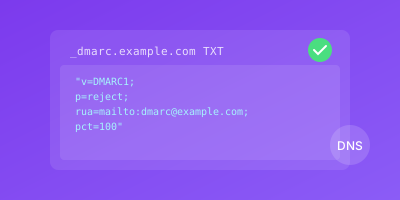
BIMI requires DMARC with p=quarantine or p=reject:
# Required for BIMI
_dmarc.example.com. IN TXT "v=DMARC1; p=quarantine; ..."

# Or
_dmarc.example.com. IN TXT "v=DMARC1; p=reject; ..."
p=none DMARC policy.Supporting Email Clients
| Client | BIMI Support | VMC Required |
|---|---|---|
| Gmail | Yes | For blue checkmark |
| Yahoo Mail | Yes | No |
| Apple Mail | Yes | For verification badge |
| Fastmail | Yes | No |
| Outlook | Coming soon | TBD |
How to Implement BIMI
BIMI implementation has several prerequisites and steps.
Prerequisites Checklist
Before starting BIMI:
- SPF configured and passing
- DKIM configured and passing
- DMARC at
p=quarantineorp=reject - High DMARC alignment rate (95%+)
- Logo in SVG Tiny PS format
- (Optional) Registered trademark for VMC
Step 1: Prepare Your Logo
BIMI requires SVG Tiny PS format (not standard SVG).
Logo Requirements:
| Requirement | Specification |
|---|---|
| Format | SVG Tiny Portable/Secure 1.2 |
| Shape | Square (1:1 aspect ratio) |
| File size | Under 32KB |
| External references | None allowed |
| Scripts | None allowed |
| Background | Solid color recommended |
Converting Your Logo:
- Start with your highest quality logo
- Use BIMI conversion tools
- Validate with BIMI validators
- Test rendering at small sizes
Step 2: Host Your Logo
Host the SVG file on HTTPS:
https://example.com/brand/logo.svg
Hosting Requirements:
- Valid HTTPS certificate
- Publicly accessible
- High availability
- Fast response times (use CDN)
Step 3: Obtain VMC (Optional)
For Gmail's blue checkmark and enhanced trust:
VMC Process:
- Register your logo as a trademark
- Choose a VMC provider (DigiCert, Entrust)
- Submit trademark documentation
- Verify organization identity
- Submit logo for review
- Receive certificate
VMC Timeline: 2-6 weeks typically
Step 4: Create BIMI DNS Record
Without VMC:
default._bimi.example.com. IN TXT "v=BIMI1; l=https://example.com/logo.svg"
With VMC:
default._bimi.example.com. IN TXT "v=BIMI1; l=https://example.com/logo.svg; a=https://example.com/certificate.pem"
Step 5: Host VMC Certificate
If using VMC, host the PEM file:
https://example.com/certificate.pem
Same requirements as logo hosting:
- Valid HTTPS
- Publicly accessible
- High availability
Step 6: Verify Implementation
Test your BIMI setup:
# Check DNS record
dig +short TXT default._bimi.example.com

# Expected output
"v=BIMI1; l=https://example.com/logo.svg"
Use BIMI validators:
- bimigroup.org/bimi-generator
- mxtoolbox.com/bimi.aspx
Step 7: Test with Real Email
Send test emails to:
- Gmail (check for logo/checkmark)
- Yahoo Mail (check for logo)
- Apple Mail (check for logo)
BIMI Implementation Best Practices
Follow these practices for optimal results.
Ensure DMARC Stability
Before BIMI, verify your DMARC reports show:
- Consistently high authentication rates
- No unexpected failures
- Stable policy at quarantine or reject
Optimize Logo for Display
Test your logo at various sizes:
| Context | Typical Size |
|---|---|
| Mobile inbox | 24x24 pixels |
| Desktop inbox | 32x32 pixels |
| Message view | 48x48 pixels |
Simple, bold designs work best.
Use Reliable Hosting
Logo and VMC files must be highly available:
- Use CDN hosting
- Monitor availability
- Fast response times
- Consider failover
Keep Assets Updated
Maintain your BIMI assets:
- Update logo if you rebrand
- Monitor VMC expiration
- Renew before certificate lapses
- Update DNS record if URLs change
Monitor DMARC Continuously
BIMI depends on DMARC success:
- Review aggregate reports
- Maintain high alignment rates
- Fix authentication issues promptly
Common BIMI Issues
Logo Not Displaying
Causes:
- DMARC policy not enforcing (
p=none) - Logo format incorrect
- File not accessible
- DNS record misconfigured
Solution: Verify each prerequisite step by step.
VMC Validation Failing
Causes:
- Certificate expired
- Trademark documentation issues
- PEM file not accessible
Solution: Check certificate validity and hosting.
Inconsistent Display
Causes:
- Some emails failing DMARC
- Client doesn't support BIMI
- Caching delays
Solution: Monitor DMARC reports for failures.
Conclusion
BIMI transforms email authentication into a visible brand asset. By displaying your logo in inboxes, you increase recognition and help users identify legitimate communications.
The road to BIMI reinforces good authentication practices. DMARC enforcement is required, making BIMI a worthwhile goal for security and branding.
Key takeaways:
- DMARC enforcement (
p=quarantineorp=reject) is required - Logo must be SVG Tiny PS format
- VMC enables enhanced features like Gmail checkmark
- Monitor DMARC continuously to maintain BIMI
Whether using basic BIMI or investing in VMC, you demonstrate commitment to both security and brand presentation.
Related Guides
- DMARC Policy Implementation — Achieve DMARC reject policy required for BIMI
- DKIM Configuration Tutorial — Set up DKIM alignment needed for BIMI validation
- Email Reputation Monitoring — Maintain the sender reputation needed for BIMI display
- SSL Certificate Types Comparison — Understand the VMC certificates used for BIMI verification