Domain-based Message Authentication, Reporting, and Conformance (DMARC) ties together SPF and DKIM into a unified policy framework. It tells receiving servers what to do when authentication fails.
DMARC also provides visibility into your email ecosystem through detailed reports. However, implementing it incorrectly can cause legitimate emails to be rejected.
What is DMARC and How Does It Work?
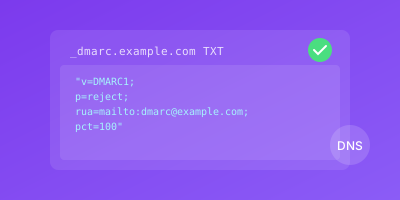
DMARC builds on SPF and DKIM by adding alignment requirements and policy instructions. It's published as a DNS TXT record at _dmarc.yourdomain.com.
DMARC Authentication Flow
- Email arrives claiming to be from your domain
- Receiving server checks your DMARC record
- It verifies SPF and DKIM results
- It checks alignment with the From header
- Based on your policy, it handles the message accordingly
Understanding Alignment
DMARC introduces alignment - the requirement that authentication matches the visible From header.
Alignment Modes:
| Mode | Requirement | Example |
|---|---|---|
| Relaxed (default) | Organizational domain match | mail.example.com aligns with example.com |
| Strict | Exact domain match | mail.example.com does NOT align with example.com |
DMARC Policy Options
The p= tag instructs receivers on handling failures:
p=none       # Monitor only, deliver normally
p=quarantine # Treat as suspicious (spam folder)
p=reject     # Refuse delivery entirely
DMARC Record Structure
v=DMARC1; p=none; rua=mailto:dmarc@example.com; ruf=mailto:forensics@example.com; pct=100
| Tag | Purpose | Example |
|---|---|---|
v= | Version (required) | DMARC1 |
p= | Policy (required) | none, quarantine, reject |
rua= | Aggregate report address | mailto:dmarc@example.com |
ruf= | Forensic report address | mailto:forensics@example.com |
pct= | Percentage to apply policy | 100 |
sp= | Subdomain policy | none, quarantine, reject |
Why DMARC Implementation is Critical
DMARC provides the policy layer that makes SPF and DKIM actionable.
Domain Protection
Without DMARC, receiving servers have no guidance on authentication failures. Your domain remains vulnerable to spoofing even with SPF and DKIM.
p=reject, attackers can send emails appearing to come from your domain. These messages will be delivered to victims.Reporting and Visibility
DMARC reports reveal critical information:
- All sources sending email as your domain
- Legitimate senders you may have forgotten
- Unauthorized use of your domain
- Configuration issues affecting deliverability
Compliance Requirements
Google and Yahoo's 2024 requirements mandate DMARC with at least p=none for bulk senders. True protection requires progressing to p=reject.
How to Implement DMARC Progressively
Follow this phased approach to implement DMARC safely.
Phase 1: Deploy p=none (Monitoring)
Start with a monitoring-only policy:
_dmarc.example.com. IN TXT "v=DMARC1; p=none; rua=mailto:dmarc-reports@example.com; ruf=mailto:dmarc-forensics@example.com"
This policy:
- Collects authentication data
- Doesn't affect email delivery
- Reveals your email ecosystem
Phase 2: Analyze Reports
DMARC aggregate reports are XML files showing authentication results.
Sample report structure:
<feedback>
  <record>
    <row>
      <source_ip>192.0.2.1</source_ip>
      <count>1000</count>
      <policy_evaluated>
        <dkim>pass</dkim>
        <spf>fail</spf>
      </policy_evaluated>
    </row>
  </record>
</feedback>
What to look for:
- Legitimate senders with SPF or DKIM failures
- Unknown sources sending as your domain
- Volume patterns indicating spoofing attempts
- Your current alignment rate
Phase 3: Fix Authentication Issues
Address all failures before enforcing:
- Add missing senders to SPF records
- Configure DKIM for all email sources
- Work with third-party services on proper authentication
- Investigate and block unauthorized senders
Target: Achieve 95%+ alignment rate before enforcement.
Phase 4: Move to Quarantine
When alignment exceeds 95%, begin enforcement:
_dmarc.example.com. IN TXT "v=DMARC1; p=quarantine; pct=10; rua=mailto:dmarc-reports@example.com"
Start with pct=10 (apply to 10% of failing messages).
Gradual rollout schedule:
| Week | pct Value | Monitor For |
|---|---|---|
| 1 | 10% | Delivery complaints |
| 2 | 25% | Support tickets |
| 3 | 50% | Bounce rate changes |
| 4 | 75% | DMARC report changes |
| 5 | 100% | Stable operation |
Phase 5: Transition to Reject
After stable quarantine, move to reject:
_dmarc.example.com. IN TXT "v=DMARC1; p=reject; pct=10; rua=mailto:dmarc-reports@example.com"
Again use gradual rollout:
# Week 1
p=reject; pct=10

# Week 2
p=reject; pct=25

# Week 3
p=reject; pct=50

# Week 4
p=reject; pct=100
p=reject enforcement provides maximum protection against domain spoofing.DMARC Implementation Best Practices
Follow these practices for successful implementation.
Use Report Processing Services
Raw DMARC reports are difficult to analyze:
- Set up dedicated email addresses
- Consider DMARC analysis services
- Build dashboards for ongoing monitoring
Establish Review Schedules
| Phase | Review Frequency |
|---|---|
| Initial p=none | Weekly |
| Transition to quarantine | Weekly |
| Transition to reject | Weekly |
| Stable enforcement | Monthly |
Don't Rush Enforcement
p=reject causes important emails to be blocked.Common forgotten sources:
- Legacy applications
- Partner integrations
- Regional offices
- Acquired company domains
Configure Subdomain Policy
Use the sp= tag for subdomains:
# Main domain enforced, subdomains monitored
v=DMARC1; p=reject; sp=none; rua=mailto:dmarc@example.com

# Both enforced
v=DMARC1; p=reject; sp=reject; rua=mailto:dmarc@example.com
Use Relaxed Alignment Initially
Start with relaxed alignment (default):
v=DMARC1; p=none; aspf=r; adkim=r; rua=mailto:dmarc@example.com
Move to strict only after thorough testing:
v=DMARC1; p=reject; aspf=s; adkim=s; rua=mailto:dmarc@example.com
Document Your Journey
Maintain records of:
- All email sources discovered through reports
- Authentication fixes applied
- Policy changes and dates
- Issues encountered and resolutions
Conclusion
DMARC implementation is a journey requiring patience and careful monitoring. Starting with p=none provides invaluable visibility, while gradual enforcement protects legitimate email.
The reward is comprehensive protection against domain spoofing and phishing. By analyzing reports and maintaining SPF/DKIM configurations, you build a robust email authentication foundation.
Key takeaways:
- Never skip the monitoring phase
- Achieve 95%+ alignment before enforcement
- Use gradual pct rollout for policy changes
- Monitor continuously even after full enforcement
Related Guides
- SPF Record Setup Guide — Configure SPF as the first step before DMARC enforcement
- DKIM Configuration Tutorial — Set up DKIM signing to pass DMARC alignment checks
- BIMI Implementation Guide — Unlock brand logos in inboxes after reaching DMARC reject
- Gmail and Yahoo Requirements 2026 — Meet mandatory DMARC requirements from major mailbox providers