Email authentication has become the cornerstone of modern email deliverability. With over 300 billion emails sent daily, mailbox providers have implemented strict authentication requirements.
In 2024, Google and Yahoo announced that bulk senders must implement proper email authentication. Failure to comply results in severe deliverability penalties.
What is Email Authentication Monitoring?
Email authentication monitoring is the continuous process of verifying your authentication records. It ensures SPF, DKIM, DMARC, MTA-STS, and BIMI are correctly configured and functioning.
Key Monitoring Activities
- Tracking DNS record propagation across regions
- Analyzing authentication pass/fail rates
- Processing DMARC aggregate and forensic reports
- Verifying sending infrastructure alignment
Unlike one-time setup, authentication monitoring is an ongoing discipline. DNS records can be accidentally modified, and third-party senders may not sign emails correctly.
Critical Metrics to Track
| Metric | Description | Target |
|---|---|---|
| SPF Alignment Rate | Envelope sender matches header From | > 95% |
| DKIM Signature Validity | All sources signing correctly | 100% |
| DMARC Compliance | Policy pass rate | > 95% |
| Authentication Failures | Potential misconfigurations | < 5% |
Why Email Authentication Monitoring Matters
The stakes for email authentication have never been higher. Major providers enforce strict requirements.
Deliverability Requirements
Google's 2024 requirements mandate bulk senders have:
- Valid SPF records for all sending domains
- DKIM signatures on all outgoing messages
- DMARC with at least
p=nonepolicy
Brand Protection
Without proper DMARC enforcement, attackers can send emails appearing to come from your domain. This damages customer trust and enables fraud.
The FBI reported that business email compromise (BEC) attacks caused over $2.7 billion in losses in 2022 alone.
Email Ecosystem Visibility
DMARC reports reveal all sources sending email on behalf of your domain, including:
- Authorized marketing platforms
- Transactional email services
- Shadow IT services you might not know about
- Potential spoofing attempts
How Email Authentication Monitoring Works
Comprehensive monitoring operates on multiple levels across your email infrastructure.
DNS-Level Monitoring
Monitoring systems regularly query your domain's TXT records for:
- SPF records at the domain root
- DKIM selectors at
selector._domainkey.domain.com - DMARC policy at
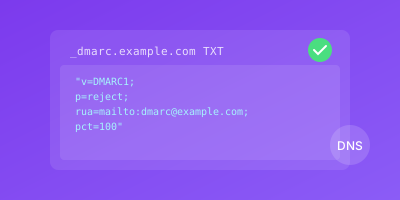
_dmarc.domain.com - MTA-STS policy at
_mta-sts.domain.com - BIMI record at
default._bimi.domain.com
SPF Monitoring
SPF monitoring specifically tracks critical limits and configurations:
v=spf1 include:_spf.google.com include:sendgrid.net ip4:192.0.2.0/24 -all
include, a, mx, and redirect counts toward this limit.Key SPF checks include:
- DNS lookup count (must be under 10)
- Validation of include mechanisms
- IP address coverage verification
- Syntax correctness
DKIM Monitoring
DKIM monitoring verifies your signing infrastructure:
- Public keys are properly published in DNS
- Key length meets security standards (2048-bit minimum)
- Key rotation schedules are maintained
- Signatures are valid across all sending sources
DMARC Report Analysis
DMARC monitoring processes two types of reports:
Aggregate Reports (RUA):
- Daily summaries from receiving mail servers
- Authentication results by source IP
- Volume and pass/fail statistics
Forensic Reports (RUF):
- Individual message failure details
- Useful for troubleshooting specific issues
- Not all providers send these due to privacy concerns
Email Authentication Monitoring Best Practices
Follow these practices to maintain robust email authentication.
Document All Email Sources
Start with comprehensive baseline documentation:
- Primary email platform (Google Workspace, Office 365)
- Marketing automation tools (Mailchimp, HubSpot)
- Transactional email services (SendGrid, Postmark)
- CRM systems sending email
- Any third-party services
Set Up Automated Monitoring
Configure alerts for immediate notification of any DNS changes:
# Example monitoring configuration
monitors:
  - type: dns_txt
    domain: example.com
    records:
      - _dmarc.example.com
      - example.com (SPF)
    alert_on: change
    check_interval: 5m
Implement Phased DMARC Enforcement
Progress through DMARC policies carefully:
- p=none - Gather data, no enforcement
- p=quarantine - Move failures to spam (when alignment > 95%)
- p=reject - Block failures completely (when fully confident)
Manage SPF Complexity
Keep SPF records maintainable:
- Consolidate IP ranges where possible
- Remove services you no longer use
- Document every entry with comments
- Consider SPF flattening if approaching limits
Establish Review Cycles
Create regular schedules for authentication review:
| Phase | Review Frequency |
|---|---|
| Implementation | Weekly |
| Transition to enforcement | Weekly |
| Stable operation | Monthly |
| After infrastructure changes | Immediately |
Conclusion
Email authentication monitoring is no longer optional in the modern email landscape. With major providers enforcing requirements and attacks rising, continuous monitoring is essential.
By implementing comprehensive monitoring, you gain:
- Full visibility into your email ecosystem
- Protection against domain abuse and spoofing
- Assurance that messages reach recipients
- Early warning of configuration issues
Start by auditing your current setup, establish monitoring baselines, and progressively strengthen your policies. The investment pays dividends in deliverability, security, and brand reputation.
Related Guides
- SPF Record Setup Guide — Configure and validate SPF records for your domains
- DKIM Configuration Tutorial — Set up DKIM signing and monitor key rotation
- DMARC Policy Implementation — Implement DMARC policies and analyze aggregate reports
- Transactional Email Monitoring — Ensure critical transactional emails pass authentication checks