When browsers connect to your HTTPS site, they don't simply accept your SSL certificate at face value. Instead, they perform chain validation, verifying a complete trust path from your certificate through intermediate certificates to a root certificate they already trust.
This chain of trust is fundamental to how SSL/TLS security works. Chain problems cause many of the SSL errors users encounter.
Understanding chain validation helps you configure certificates correctly, troubleshoot SSL issues faster, and maintain reliable HTTPS services.
What is SSL Certificate Chain Validation?
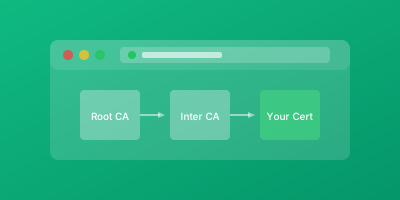
SSL certificate chains establish trust through a hierarchy:
- Your server certificate is signed by an intermediate Certificate Authority (CA)
- The intermediate CA is signed by another intermediate or by a root CA
- Root CAs are implicitly trusted (operating systems and browsers ship with pre-installed lists of trusted root certificates)
The Validation Process
When validating a chain, clients verify each link:
- Your certificate was signed by the intermediate CA's private key
- The intermediate was signed by the next CA up the chain
- This continues until reaching a trusted root
Why Chain Validation Matters
Chain validation failures cause SSL errors that users see as security warnings or connection failures.
The Unpredictable Nature of Chain Issues
Unlike certificate expiration (which you control), chain problems can emerge from changes you didn't make:
- CAs restructure their hierarchies
- Intermediate certificates are deprecated
- Root certificates are distrusted by browsers
User Impact
The user impact of chain failures mirrors certificate expiration: frightening security warnings that drive users away.
However, chain issues can be more insidious because they sometimes affect only certain clients. A chain missing an intermediate might work for clients that have cached the intermediate from previous connections while failing for new visitors.
Security Implications
Chain validation is also important for security. Proper validation prevents man-in-the-middle attackers from presenting fraudulent certificates. When chains are not validated correctly, the entire security model of HTTPS breaks down.
How Chain Validation Works
During TLS handshake, your server sends its certificate along with any necessary intermediate certificates. The client then builds and validates the chain through several steps.
Step 1: Signature Validation
The client verifies each certificate's signature using the public key of its issuer:
- Your server certificate's signature is verified with the intermediate CA's public key
- The intermediate's signature is verified with the next issuer's key
- This continues to the root
Step 2: Validity Period Checks
Every certificate in the chain must be within its valid date range. Certificates must not be expired and must not be "not yet valid."
Step 3: Revocation Checking
Certificates may be revoked before expiration if compromised. Clients check revocation status via:
- Certificate Revocation Lists (CRL)
- Online Certificate Status Protocol (OCSP)
Step 4: Trust Anchor Verification
The chain must terminate at a root certificate in the client's trust store.
Step 5: Constraint Verification
CAs include constraints limiting what certificates their intermediates can issue. Validation verifies these constraints are respected.
Diagnosing Chain Issues
Use OpenSSL to inspect and validate certificate chains:
# View the full certificate chain
openssl s_client -connect example.com:443 -servername example.com -showcerts

# Verify the chain is complete and valid
openssl s_client -connect example.com:443 -servername example.com 2>&1 | grep -E "(Verify|depth)"

# Download and inspect a certificate
echo | openssl s_client -connect example.com:443 -servername example.com 2>/dev/null | openssl x509 -text -noout
Chain Configuration Best Practices
Always Send the Complete Chain
Configure your server to send the complete chain from your server certificate through all intermediates (but not the root). Most CAs provide a "certificate chain" or "full chain" file specifically for this purpose.
Test from Multiple Perspectives
- Use SSL checker websites like SSL Labs to verify your chain configuration
- Test from different browsers and operating systems (trust stores vary)
- Test from mobile devices
- Test from command-line tools
Monitor Chain Validity Continuously
Certificate monitoring services like WizStatus verify that chains are complete and valid, alerting you to problems before users encounter them.
Keep Intermediate Certificates Updated
When your CA provides new versions of intermediate certificates, update them. CAs occasionally re-issue intermediates, and using outdated intermediates can cause validation failures for some clients.
Verify After Any Certificate Changes
Check chain validity after:
- New certificate deployment
- Server configuration changes
- CDN or proxy configuration updates
Conclusion
Certificate chain validation is the mechanism that makes SSL/TLS security work. It establishes verifiable trust from your certificate to pre-trusted root authorities.
Key Actions
- Ensure your servers provide complete chains
- Test validation from multiple perspectives
- Implement monitoring that verifies chain validity continuously
These practices prevent chain-related SSL errors that frustrate users and undermine trust in your services.
Related Guides
- SSL Certificate Monitoring: Complete Guide — Monitor chain validity alongside certificate expiry
- SSL Pinning Explained — Pin specific certificates in the chain for enhanced security
- Certificate Transparency Logs — Verify certificate issuance through transparency logs
- SSL Certificate Types Comparison — Understand how DV, OV, and EV certificates differ in chain structure