SSL/TLS certificate pinning is an advanced security technique that restricts which certificates a client will accept for a specific domain. Rather than trusting any certificate signed by any trusted CA, pinned clients accept only specific certificates or public keys you've explicitly configured.
Pinning protects against attacks where adversaries obtain fraudulent certificates from compromised CAs, or where malicious CAs issue certificates for domains they shouldn't. These aren't theoretical risks. Certificate mis-issuance has occurred at multiple CAs.
However, pinning introduces significant operational complexity and risks. This guide explains when it provides value and how to implement it safely.
What is SSL Pinning?
SSL pinning (also called certificate pinning or public key pinning) configures clients to accept only specific certificates or public keys when connecting to particular domains. Instead of trusting the entire CA ecosystem, pinned connections trust only what you've explicitly specified.
Pinning Approaches
| Approach | What's Pinned | Flexibility |
|---|---|---|
| Certificate pinning | Specific certificates | Lowest - fails on any certificate change |
| Public key pinning | The public key | Medium - allows renewal with same key |
| CA pinning | Specific CAs | Highest - accepts any cert from trusted CAs |
Where Pinning Can Be Implemented
- Mobile applications: Pin in code or configuration
- Browsers: HTTP Public Key Pinning headers (now deprecated)
- Custom applications: Implement in TLS configuration
Why Pinning Matters (And When It Doesn't)
The Threat Pinning Addresses
Pinning protects against fraudulent certificates issued by compromised or malicious CAs. If an attacker obtains a valid-looking certificate for your domain from any trusted CA, they can perform man-in-the-middle attacks that normal certificate validation wouldn't detect.
Pinned clients reject these fraudulent certificates because they don't match the pin.
High-Security Use Cases
This matters most for high-security applications where targeted attacks are realistic threats:
- Banking and financial apps
- Cryptocurrency wallets
- Secure messaging apps
- Corporate VPN clients
- Healthcare applications with sensitive data
What Pinning Doesn't Protect Against
Overestimating pinning's value leads to misallocated security investment. For most websites and applications, standard certificate validation provides sufficient security without pinning's operational burden.
How SSL Pinning Works
During TLS handshake, after receiving the server certificate, a pinning-enabled client:
- Extracts the relevant identity (full certificate, public key, or public key hash)
- Compares it against configured pins
- Proceeds if the identity matches a pin
- Rejects the connection if it doesn't match (regardless of certificate validity)
Implementation by Platform
iOS (URLSession):
// Native pinning support in URLSession
let pinnedCertificates = [SecCertificate]()
let serverTrust: SecTrust = // from challenge
SecTrustSetAnchorCertificates(serverTrust, pinnedCertificates as CFArray)
Android (Network Security Config):
<!-- res/xml/network_security_config.xml -->
<network-security-config>
    <domain-config>
        <domain includeSubdomains="true">example.com</domain>
        <pin-set expiration="2025-01-01">
            <pin digest="SHA-256">base64EncodedPublicKeyHash=</pin>
            <pin digest="SHA-256">backupPinHash=</pin>
        </pin-set>
    </domain-config>
</network-security-config>
HTTP Public Key Pinning (HPKP) - Deprecated
HPKP allowed websites to instruct browsers to pin via HTTP headers. However, it was deprecated and removed from browsers due to:
- Risk of "hostile pinning" by attackers
- Self-inflicted denial of service from misconfiguration
- Long recovery times from mistakes
Backup Pins Are Essential
You must pin at least one backup key to enable certificate rotation without breaking connections.
SSL Pinning Best Practices
Evaluate Whether Pinning Is Necessary
Carefully evaluate whether pinning provides meaningful security value for your specific application.
- Is your application a high-value target for nation-state or sophisticated attackers?
- Do you handle highly sensitive data (financial, healthcare, national security)?
- Is the operational complexity justified by your threat model?
For most web services, Certificate Transparency monitoring provides similar protection with far less operational risk.
Pin to Public Keys, Not Certificates
Key pinning allows normal certificate renewal and rotation as long as you maintain the same key pair.
# Extract public key hash for pinning
openssl s_client -connect example.com:443 2>/dev/null | \
  openssl x509 -pubkey -noout | \
  openssl pkey -pubin -outform DER | \
  openssl dgst -sha256 -binary | \
  base64
Include Multiple Backup Pins
Include at least 2-3 backup pins to:
- Enable key rotation
- Provide recovery options if your primary key is compromised
- Prevent lockouts during emergencies
Implement Gradual Enforcement
Start with report-only mode that logs pin failures without blocking connections. This allows you to identify issues before they cause outages.
Plan for Pin Updates
Mobile apps require updates to change pins. If certificates change before users update, they're locked out.
- Build pin update mechanisms into your app release cycle
- Provide adequate lead time before certificate changes
- Consider server-side pin configuration for faster updates
Consider CA Pinning
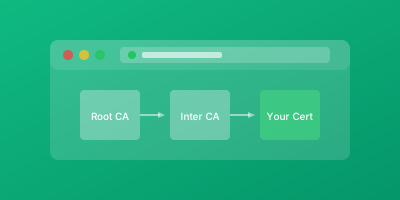
Pinning to intermediate CAs rather than leaf certificates provides more flexibility while still restricting trust significantly.
Conclusion
SSL pinning provides strong protection against certificate mis-issuance but introduces significant operational complexity and bricking risk.
When to Use Pinning
- High-security mobile applications handling sensitive data
- Applications facing sophisticated targeted threats
- When compliance requirements mandate it
When to Skip Pinning
- Most web services and standard applications
- When Certificate Transparency monitoring is sufficient
- When operational complexity isn't justified
Related Guides
- SSL Certificate Monitoring: Complete Guide — Monitor certificate validity and detect pinning mismatches
- SSL Chain Validation Explained — Understand the trust chain that pinning relies on
- Certificate Transparency Logs — Detect unauthorized certificates that bypass pinning
- TLS 1.2 vs TLS 1.3 Differences — Learn how TLS version affects pinning implementation