Health check endpoints are a fundamental component of production-ready REST APIs. They provide a standardized way for monitoring systems, load balancers, and orchestration platforms to assess service health.
A well-designed health check endpoint does more than return 200 OK. It provides meaningful information about the service's ability to handle requests and its dependency health.
What Are Health Check Endpoints?
Health check endpoints are dedicated API routes that report the operational status of a service. They serve multiple purposes:
- Load balancers use them to determine which instances can receive traffic
- Orchestration systems use them to manage container lifecycle
- Monitoring systems use them to track availability and alert on issues
Common Health Check Patterns
| Pattern | Endpoint | Purpose |
|---|---|---|
| Liveness | /health/live or /healthz | Is the process running? |
| Readiness | /health/ready | Can it handle requests? |
| Deep health | /health/complete | Are all dependencies healthy? |
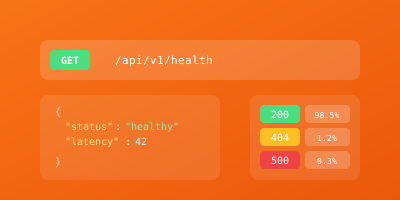
These endpoints typically return JSON responses with status fields. HTTP status codes convey the overall health (200 for healthy, 503 for unhealthy), while response bodies provide diagnostic details.
Why Health Check Design Matters
Avoiding Operational Problems
Poor health check implementation causes real operational problems:
Conversely, a too-simple health check that always returns 200 might keep routing traffic to an instance that's running but unable to serve requests.
Kubernetes Integration
Health checks are critical for container orchestration. Kubernetes uses:
- Liveness probes: To restart unhealthy containers
- Readiness probes: To control traffic routing
Incorrect probe configuration is a leading cause of deployment issues and service disruptions.
Debugging and Documentation
Health endpoints serve as documentation and debugging aids. A detailed health response helps operators quickly identify which component is causing issues without digging through logs.
How to Design Health Check Endpoints
Implement Two Core Endpoints
At minimum, implement liveness and readiness endpoints.
Liveness Endpoint
The liveness endpoint (/health/live) should return quickly with minimal logic:
app.get('/health/live', (req, res) => {
  res.status(200).json({ status: 'alive' });
});
Readiness Endpoint
The readiness endpoint (/health/ready) checks whether the service can handle actual requests:
app.get('/health/ready', async (req, res) => {
  try {
    await db.ping();
    await cache.ping();
    res.status(200).json({ status: 'ready' });
  } catch (error) {
    res.status(503).json({ status: 'not_ready', error: error.message });
  }
});
Return 503 if any critical dependency is unavailable.
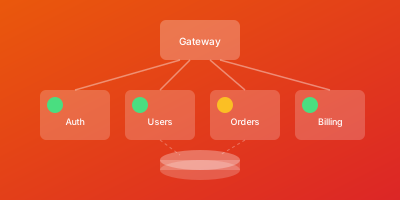
Implement Detailed Health Checks
For comprehensive monitoring, implement a detailed health endpoint:
{
  "status": "healthy",
  "timestamp": "2025-01-17T10:30:00Z",
  "version": "1.2.3",
  "components": {
    "database": {
      "status": "healthy",
      "latency_ms": 5
    },
    "cache": {
      "status": "healthy",
      "latency_ms": 1
    },
    "external_api": {
      "status": "degraded",
      "latency_ms": 500
    }
  }
}
Consider Partial Health States
An API might function with degraded cache performance or when a non-critical external service is unavailable. Design health responses that distinguish between:
- Healthy: All systems operational
- Degraded: Functional but with reduced performance
- Unhealthy: Unable to serve requests
Health Check Best Practices
Keep Liveness Probes Fast
Liveness probes should:
- Complete in under 100ms
- Never fail due to dependency issues
- Avoid external calls
Implement Timeouts for Readiness Checks
A database check that hangs indefinitely makes your health endpoint unreliable:
const checkDatabase = async () => {
  const timeout = new Promise((_, reject) =>
    setTimeout(() => reject(new Error('Timeout')), 2000)
  );
  return Promise.race([db.ping(), timeout]);
};
Set reasonable timeouts (1-2 seconds) and treat timeout as unhealthy.
Cache Dependency Results
For deep health endpoints, cache results briefly to avoid hammering dependencies:
let cachedHealth = null;
let cacheTime = 0;

app.get('/health/complete', async (req, res) => {
  const now = Date.now();
  if (cachedHealth && now - cacheTime < 5000) {
    return res.json(cachedHealth);
  }

  cachedHealth = await checkAllDependencies();
  cacheTime = now;
  res.json(cachedHealth);
});
A 5-10 second cache is usually appropriate.
Include Version Information
Include version information in health responses to help diagnose deployment-related issues:
{
  "status": "healthy",
  "version": "2.3.1",
  "git_sha": "abc123f"
}
Never Expose Sensitive Information
Configure Kubernetes Probes Appropriately
livenessProbe:
  httpGet:
    path: /health/live
    port: 8080
  initialDelaySeconds: 30
  periodSeconds: 10
  failureThreshold: 3
  timeoutSeconds: 5

readinessProbe:
  httpGet:
    path: /health/ready
    port: 8080
  initialDelaySeconds: 5
  periodSeconds: 5
  failureThreshold: 3
  timeoutSeconds: 3
Key settings:
initialDelaySeconds: Give the application time to startperiodSecondsandfailureThreshold: Avoid reacting to transient issuestimeoutSeconds: Ensure it exceeds your worst-case response time
Conclusion
Well-designed health check endpoints are essential infrastructure for operating reliable REST APIs. By implementing thoughtful liveness, readiness, and detailed health endpoints, you enable automated systems to make good decisions about routing and lifecycle management.
Key Takeaways
- Invest time in getting health checks right
- Test health check behavior under various failure scenarios
- Tune probe configurations based on actual application behavior
The health check infrastructure you build will be exercised constantly in production, making it some of the most critical code in your service.
Related Guides
- API Monitoring Best Practices — Use health check endpoints as part of a complete monitoring strategy
- gRPC Health Checking Protocol — Compare REST health checks with the gRPC health checking standard
- Microservices Observability Guide — Health check patterns for distributed microservice architectures
- Uptime Monitoring Best Practices — Integrate health check endpoints into your uptime monitoring