API response time directly impacts user experience, system scalability, and business outcomes. Studies consistently show that latency increases lead to user abandonment.
Each 100ms of additional latency causes measurable drops in conversion rates. For APIs serving mobile applications, the impact is even more pronounced due to variable network conditions.
What is API Response Time Optimization?
API response time optimization is the systematic process of measuring, analyzing, and improving the time between receiving an API request and sending the response.
The Full Request Lifecycle
The total response time encompasses multiple stages:
- Network transit (client to server)
- Load balancer processing
- Application handling
- Database queries
- External service calls
- Response serialization
- Network transit (server to client)
Percentiles Over Averages
Percentile metrics reveal the experience of users at the tail of the distribution, who are often the most affected by performance issues.
Connection to SLOs
Response time optimization connects to broader concepts:
- SLOs (Service Level Objectives): Acceptable performance thresholds
- Error budgets: Allowable degradation before intervention
- SLIs (Service Level Indicators): What you actually measure
Defining acceptable performance thresholds and tracking against them provides focus for optimization efforts.
Why API Performance Monitoring Matters
Cascade Effect
Response time affects every dependent system and user:
- Slow APIs cause mobile apps to feel sluggish
- Web pages load slowly
- Batch jobs miss deadlines
- Microservices cascade timeouts
The impact multiplies across the dependency tree.
Gradual Degradation
Performance degradation often happens gradually:
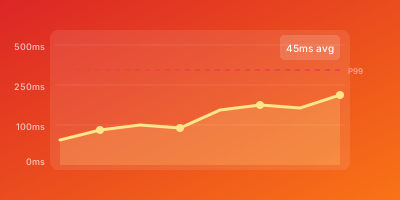
Week 1:  avg 95ms
Week 10: avg 100ms
Week 20: avg 110ms
Week 50: avg 145ms
A 5ms increase per week goes unnoticed until suddenly your API is 50% slower than a year ago. Continuous monitoring catches regression early.
Correlation with Reliability
Services under performance stress often experience:
- Higher error rates
- Resource exhaustion
- Cascading failures
Monitoring performance alongside availability provides early warning of impending outages.
Cost Efficiency
Faster APIs serve more requests per instance, reducing infrastructure costs. Understanding performance characteristics helps right-size resources.
How to Monitor and Optimize API Performance
Implement Comprehensive Instrumentation
Capture the full request lifecycle:
app.use(async (req, res, next) => {
  const start = process.hrtime.bigint();
  const timings = {};

  // Attach timing collector to request
  req.recordTiming = (label) => {
    timings[label] = process.hrtime.bigint() - start;
  };

  res.on('finish', () => {
    const total = process.hrtime.bigint() - start;
    metrics.recordRequest({
      path: req.path,
      method: req.method,
      status: res.statusCode,
      total_ns: total,
      timings: timings
    });
  });

  next();
});
Break down server-side time into components:
- Routing
- Authentication
- Business logic
- Database queries
- External calls
- Serialization
Use Distributed Tracing
Visualize request flow across services:
const span = tracer.startSpan('api.request');

// Database query
const dbSpan = tracer.startSpan('database.query', { childOf: span });
const result = await db.query(sql);
dbSpan.finish();

// External service
const extSpan = tracer.startSpan('external.service', { childOf: span });
const data = await externalApi.fetch();
extSpan.finish();

span.finish();
Tools like Jaeger, Zipkin, or cloud-native APM reveal which component contributes most to latency.
Define Meaningful SLOs
Set SLOs based on user expectations and business requirements:
| Endpoint | p95 SLO | Rationale |
|---|---|---|
/checkout | 200ms | Critical user action |
/search | 500ms | User expects some delay |
/reports | 5s | Background operation |
Analyze Latency Distributions
Look beyond aggregates to understand the shape of your latency:
// Bimodal distribution might indicate:
// - Cache hits (fast) vs misses (slow)
// - Simple vs complex requests
// - Healthy vs degraded backends

function analyzeDistribution(latencies) {
  return {
    p50: percentile(latencies, 50),
    p75: percentile(latencies, 75),
    p90: percentile(latencies, 90),
    p95: percentile(latencies, 95),
    p99: percentile(latencies, 99),
    max: Math.max(...latencies)
  };
}
Bimodal distributions guide optimization strategy differently than normal distributions.
Create Data-Driven Hypotheses
Let monitoring data guide prioritization:
Observation: p99 latency is 2s while p50 is 100ms
Analysis: Trace sampling shows 95% of slow requests hit external payment API
Hypothesis: Payment API timeout is causing tail latency
Action: Implement async payment processing with faster user response
API Performance Optimization Best Practices
Set Realistic SLOs
Base SLOs on:
- Actual user needs (not engineering ego)
- System capabilities (achievable targets)
- Business requirements (what matters)
Monitor from Multiple Perspectives
| Perspective | What It Reveals |
|---|---|
| Synthetic tests | Consistent baseline performance |
| Real user monitoring | Actual experience variations |
| Server-side metrics | Diagnostic detail |
Each perspective reveals different insights.
Implement Load Testing
Understand how latency changes under load:
# k6 load test example
k6 run --vus 100 --duration 5m load-test.js
Regular load tests prevent performance surprises during traffic spikes.
Track Latency by Request Characteristics
Different requests have different performance profiles:
metrics.recordLatency({
  endpoint: '/api/search',
  latency: duration,
  dimensions: {
    query_complexity: calculateComplexity(query),
    result_count: results.length,
    user_tier: user.tier,
    region: req.headers['cf-ipcountry']
  }
});
Segmented analysis identifies specific patterns that need optimization.
Create Performance Budgets
Before launching new features, establish expected latency impact:
# performance-budget.yaml
features:
  new_recommendation_engine:
    expected_latency_increase: 15ms
    maximum_allowed: 25ms
    affected_endpoints:
      - /api/products
      - /api/homepage
Verify through testing before deployment.
Automate Regression Detection
Run performance tests in CI/CD pipelines:
# GitHub Actions example
- name: Performance Test
  run: |
    npm run perf-test

- name: Check Regression
  run: |
    if [ $(cat perf-results.json | jq '.p95') -gt 250 ]; then
      echo "Performance regression detected"
      exit 1
    fi
Conclusion
API response time optimization is a continuous discipline that combines monitoring, analysis, and targeted improvements. By measuring percentile latencies, defining meaningful SLOs, and systematically identifying bottlenecks, teams can maintain and improve API performance over time.
Key Takeaways
- Track percentiles, not just averages
- Define SLOs based on real user needs
- Use distributed tracing to identify bottlenecks
- Automate performance regression detection
Optimization is iterative. Address the largest bottlenecks first, verify improvements through monitoring, and continuously reassess as your system evolves.
Related Guides
- API Monitoring Best Practices — Monitor response times as part of a complete API strategy
- REST API Health Check Endpoints — Build health checks that measure response time degradation
- Synthetic vs Real User Monitoring — Combine synthetic and RUM to track API response times accurately
- SRE Golden Signals Monitoring — Optimize latency as one of the four golden signals