Slow APIs frustrate users and lose business. Here's how to set up comprehensive API response time monitoring to catch performance issues before they impact users.
Why Monitor API Response Time?
The Cost of Slow APIs
- User experience - Slow APIs = slow apps = frustrated users
- Conversion rates - Every 100ms delay reduces conversions by 1%
- SEO impact - Core Web Vitals affected by slow backends
- SLA compliance - Many contracts require <200ms response times
- Revenue - Amazon found 100ms = 1% sales loss
What to Monitor
| Metric | Description | Target |
|---|---|---|
| Response time | Time to first byte (TTFB) | <200ms |
| P50 latency | Median response time | <100ms |
| P95 latency | 95th percentile | <500ms |
| P99 latency | 99th percentile | <1000ms |
| Error rate | Failed requests | <0.1% |
External Monitoring Setup
HTTP Endpoint Monitoring
Set up checks from multiple locations:
yaml
# Example monitoring configuration
monitors:
  - name: "API - Get Users"
    url: "https://api.example.com/v1/users"
    method: GET
    headers:
      Authorization: "Bearer ${API_KEY}"
    interval: 60
    timeout: 10000
    locations:
      - us-east
      - eu-west
      - asia-pacific
    alerts:
      response_time: 500
      status_not: 200
Critical Endpoints to Monitor
Prioritize these:
- Authentication endpoints
- Core business logic APIs
- Payment processing
- Third-party integrations
- Health check endpoints
Synthetic API Testing
Create Test Scenarios
javascript
// API test scenario
const testUserFlow = async () => {
  const start = Date.now();

  // Step 1: Authenticate
  const auth = await fetch('/api/auth/login', {
    method: 'POST',
    body: JSON.stringify({ email: 'test@example.com', password: 'test' })
  });

  // Step 2: Get user data
  const token = (await auth.json()).token;
  const user = await fetch('/api/user/profile', {
    headers: { Authorization: `Bearer ${token}` }
  });

  // Step 3: Update something
  await fetch('/api/user/settings', {
    method: 'PATCH',
    headers: { Authorization: `Bearer ${token}` },
    body: JSON.stringify({ theme: 'dark' })
  });

  return Date.now() - start;
};
Application-Level Monitoring
Instrument Your API
Node.js/Express:
javascript
const responseTime = require('response-time');

app.use(responseTime((req, res, time) => {
  // Log to your metrics system
  metrics.timing('api.response_time', time, {
    endpoint: req.route?.path,
    method: req.method,
    status: res.statusCode
  });
}));
Python/FastAPI:
python
import time
from fastapi import Request

@app.middleware("http")
async def add_response_time(request: Request, call_next):
    start = time.time()
    response = await call_next(request)
    duration = time.time() - start

    # Log metrics
    metrics.timing("api.response_time", duration * 1000, tags={
        "endpoint": request.url.path,
        "method": request.method,
        "status": response.status_code
    })

    response.headers["X-Response-Time"] = str(duration)
    return response
Setting Up Alerts
Alert Thresholds
| Severity | Condition | Action |
|---|---|---|
| Warning | P95 > 500ms | Slack notification |
| High | P95 > 1000ms | Slack + Email |
| Critical | P95 > 2000ms | PagerDuty + SMS |
| Emergency | Error rate > 5% | All channels |
Anomaly Detection
Don't just use static thresholds:
python
# Detect anomalies based on historical baseline
def is_anomaly(current_latency, historical_avg, historical_std):
    z_score = (current_latency - historical_avg) / historical_std
    return abs(z_score) > 3  # More than 3 standard deviations
Performance Debugging
Slow Endpoint Analysis
When response times spike:
- Check database queries - Slow queries often cause slow APIs
- Review recent deployments - New code might have issues
- Check external dependencies - Third-party APIs slowing you down
- Analyze traffic patterns - Load spike?
- Review resource usage - CPU/Memory constraints
Distributed Tracing
Use tracing to find bottlenecks:
javascript
// OpenTelemetry example
const span = tracer.startSpan('api.get_users');
try {
  span.setAttribute('user.count', users.length);
  return users;
} finally {
  span.end();
}
API Monitoring Dashboard
Key Visualizations
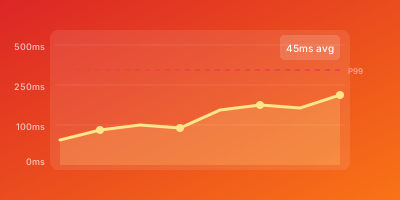
- Response time trend - Line chart over time
- Percentile distribution - P50, P95, P99 comparison
- Error rate - Separate line or bar chart
- Endpoint heatmap - Which endpoints are slowest?
- Geographic breakdown - Performance by region
Example Dashboard Layout
text
┌─────────────────────────────────────────┐
│         Response Time (24h)              │
│   [Line chart: P50, P95, P99]           │
├─────────────────────┬───────────────────┤
│   Error Rate        │   Requests/sec    │
│   [Gauge: 0.05%]    │   [Gauge: 1,234]  │
├─────────────────────┴───────────────────┤
│         Slowest Endpoints               │
│   1. POST /api/reports     892ms        │
│   2. GET /api/analytics    456ms        │
│   3. POST /api/uploads     234ms        │
└─────────────────────────────────────────┘
API Monitoring Checklist
- Critical endpoints identified
- External monitoring configured
- Multiple monitoring locations
- Response time thresholds set
- Error rate alerts configured
- Application instrumented
- Dashboard created
- Team notified of alerts
- Runbook for incidents
- Regular performance reviews
WizStatus monitors your API endpoints from 6+ global locations. Get instant alerts when response times exceed your thresholds, with detailed latency metrics and historical trends.