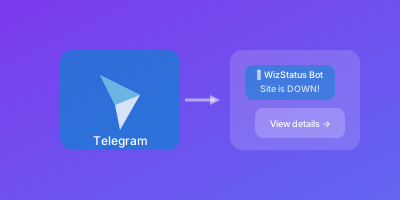
Telegram's bot API makes it perfect for monitoring alerts. Fast delivery, great mobile experience, and completely free. Here's how to set up server down notifications via Telegram.
Why Telegram for Alerts?
- Instant delivery - Push notifications arrive immediately
- Great mobile app - Works everywhere
- Free - No costs for messages
- Bot API - Easy to integrate
- Groups - Share alerts with team
- Security - End-to-end encryption available
Creating a Telegram Bot
Step 1: Create the Bot
- Open Telegram
- Search for
@BotFather - Send
/newbot - Choose a name (e.g., "Server Monitor")
- Choose a username (e.g.,
my_server_monitor_bot) - Save the API token provided
Done! Congratulations on your new bot. You will find it at
t.me/my_server_monitor_bot

Use this token to access the HTTP API:
123456789:ABCdefGHIjklMNOpqrsTUVwxyz
Step 2: Get Your Chat ID
You need your chat ID to receive messages.
For personal alerts:
- Start a chat with your new bot
- Send any message
- Open:
https://api.telegram.org/bot<YOUR_TOKEN>/getUpdates - Find your chat ID in the response:
{
  "result": [{
    "message": {
      "chat": {
        "id": 123456789,  // This is your chat ID
        "type": "private"
      }
    }
  }]
}
For group alerts:
- Add bot to group
- Send message in group
- Use getUpdates to find group chat ID (will be negative)
Step 3: Test the Bot
Send a test message:
curl -X POST "https://api.telegram.org/bot<YOUR_TOKEN>/sendMessage" \
  -d "chat_id=<YOUR_CHAT_ID>" \
  -d "text=Test alert from monitoring"
Integrating with Monitoring
Native Integration
If your monitoring service supports Telegram:
- Go to notification settings
- Add Telegram integration
- Enter bot token and chat ID
Webhook Integration
For custom webhook support, create a simple relay:
from flask import Flask, request
import requests

app = Flask(__name__)

TELEGRAM_TOKEN = "your-bot-token"
CHAT_ID = "your-chat-id"

@app.route('/webhook', methods=['POST'])
def webhook():
    data = request.json

    message = f"""
🔴 *{data['status'].upper()}*

*Monitor:* {data['monitor']}
*URL:* {data['url']}
*Error:* {data.get('error', 'N/A')}
*Duration:* {data.get('duration', 'N/A')}
    """

    requests.post(
        f"https://api.telegram.org/bot{TELEGRAM_TOKEN}/sendMessage",
        json={
            "chat_id": CHAT_ID,
            "text": message,
            "parse_mode": "Markdown"
        }
    )

    return {"ok": True}
Message Formatting
Markdown Formatting
Telegram supports Markdown in messages:
message = """
🔴 *ALERT: Server Down*

*Monitor:* Production API
*Status:* HTTP 500
*Duration:* 5 minutes
*Location:* US-East

[View Dashboard](https://dashboard.example.com)
"""

requests.post(
    f"https://api.telegram.org/bot{token}/sendMessage",
    json={
        "chat_id": chat_id,
        "text": message,
        "parse_mode": "Markdown"
    }
)
HTML Formatting
For more control:
message = """
🔴 <b>ALERT: Server Down</b>

<b>Monitor:</b> Production API
<b>Status:</b> HTTP 500
<b>Duration:</b> 5 minutes

<a href="https://dashboard.example.com">View Dashboard</a>
"""

requests.post(url, json={
    "chat_id": chat_id,
    "text": message,
    "parse_mode": "HTML"
})
Alert Types with Emojis
Visual indicators for quick scanning:
| Status | Emoji | Message Start |
|---|---|---|
| Down | 🔴 | CRITICAL |
| Degraded | 🟠 | WARNING |
| Recovered | 🟢 | RECOVERED |
| SSL Expiry | 🔒 | SSL WARNING |
| Info | 📢 | INFO |
Group Alerts
Creating an Alerts Group
- Create Telegram group
- Add team members
- Add your monitoring bot
- Get group chat ID (negative number)
Role Mentions
Telegram doesn't have roles, but you can:
- Mention users:
@username - Use keywords team monitors
Inline Buttons
Add action buttons to alerts:
requests.post(
    f"https://api.telegram.org/bot{token}/sendMessage",
    json={
        "chat_id": chat_id,
        "text": "🔴 Production API is DOWN",
        "reply_markup": {
            "inline_keyboard": [[
                {"text": "View Dashboard", "url": "https://..."},
                {"text": "Acknowledge", "callback_data": "ack_123"}
            ]]
        }
    }
)
Handle button clicks with a bot handler.
Notification Settings
Muting Non-Critical
Use silent messages for warnings:
requests.post(url, json={
    "chat_id": chat_id,
    "text": "⚠️ High latency detected",
    "disable_notification": True  # Silent
})
Channel Broadcasting
For public status updates, use Telegram channels:
- Create a channel
- Add bot as administrator
- Post updates to @channelname or channel ID
Reliability Tips
Retry Logic
import requests
from tenacity import retry, stop_after_attempt

@retry(stop=stop_after_attempt(3))
def send_telegram_alert(message):
    response = requests.post(
        f"https://api.telegram.org/bot{TOKEN}/sendMessage",
        json={"chat_id": CHAT_ID, "text": message},
        timeout=10
    )
    response.raise_for_status()
Backup Channel
Have a backup notification method:
- If Telegram fails, fall back to email
- Log all alert attempts
Security Best Practices
- Keep token secret - Never commit to git
- Use environment variables - Store token securely
- Validate webhooks - Check request origin
- Rate limit - Avoid Telegram rate limits
Troubleshooting
Messages Not Arriving
- Verify token is correct
- Check chat ID
- Ensure bot is not blocked
- Test with curl directly
Rate Limiting
Telegram limits: ~30 messages/second globally
Solutions:
- Aggregate alerts
- Queue messages
- Use deduplication
Bot Blocked
If user blocks bot, sending fails. Handle gracefully:
if response.status_code == 403:
    log("User blocked the bot")
Telegram Integration Checklist
- Bot created via BotFather
- Bot token saved securely
- Chat ID obtained
- Test message sent successfully
- Monitoring tool configured
- Message formatting tested
- Group added (if team alerts)
- Backup notification configured